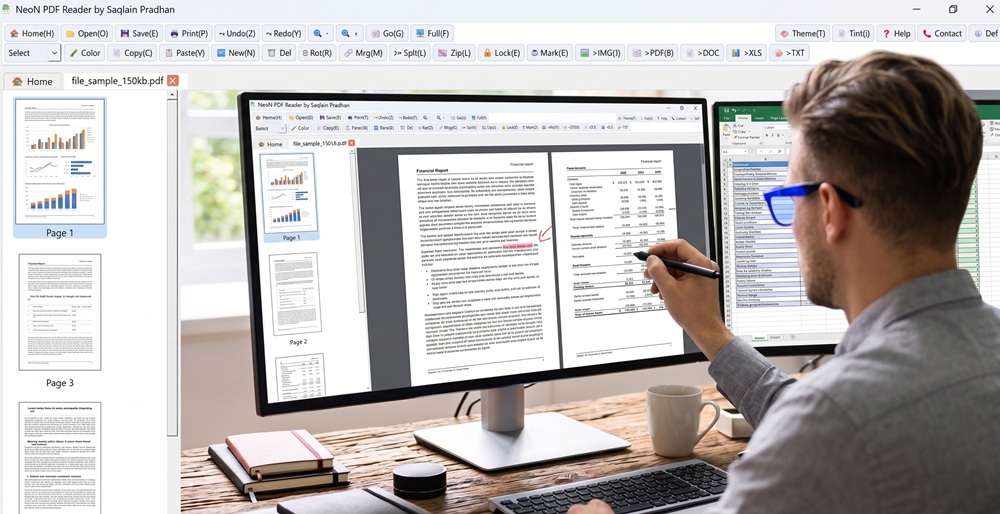
Introducing NeoN PDF Reader: The All-in-One Solution for Your Document Needs
Finding a PDF reader that balances simplicity with a powerhouse of features can be a challenge. Often, you are forced to download one app to read your documents, another to merge them, and yet a third to convert them. Enter NeoN PDF Reader, developed by Saqlain Prodhan—a comprehensive desktop tool designed to handle every aspect of your PDF workflow from a single, intuitive interface.
Whether you are a student organizing research, a professional managing invoices, or just someone who wants total control over their digital documents, NeoN PDF Reader is built to streamline your productivity. Download Now
Here is a deep dive into what makes NeoN PDF Reader a standout choice for document management.
🚀 Key Features That Set NeoN PDF Reader Apart
1. Seamless Document Conversion
One of the most frustrating aspects of managing PDFs is getting the data out of them. NeoN completely eliminates this hassle with a robust suite of built-in conversion tools. Right from the main toolbar, you can convert your PDFs to multiple formats with a single click:
PDF to Word (>DOC): Easily extract text for heavy editing.
PDF to Excel (>XLS): Pull tables and financial data into spreadsheets without manual data entry.
PDF to Text (>TXT): Strip away formatting for clean, plain text.
PDF to Image (>IMG): Turn your document pages into high-quality image files.
2. Powerful Page Manipulation
You don’t need expensive premium software to organize your files. NeoN equips you with essential manipulation tools right at your fingertips:
Merge (Mrg) & Split (Splt): Combine multiple reports into a single cohesive file, or extract exactly the pages you need from a massive document.
Rotate (Rot) & Delete (Del): Quickly fix upside-down scans and remove blank or irrelevant pages to keep your documents clean.
3. Top-Tier Security and Watermarking
Protecting your intellectual property and sensitive information is crucial.
Lock your PDFs: Use the Lock feature to secure your files against unauthorized access.
Custom Watermarks: Use the Mark tool to stamp your documents, ensuring your work is properly credited and protected from unauthorized distribution.
4. A Fully Customizable Reading Experience
Staring at a bright white screen all day can cause serious eye strain. NeoN PDF Reader prioritizes user comfort with built-in customization options:
Themes & Tints: Easily toggle your UI Theme or apply a Tint to the document background to create a reading environment that is gentle on your eyes, whether you are working late at night or in a brightly lit office.
Fluid Navigation: With quick access to Full Screen mode, precise Zoom controls, and a direct Go-to-page function, navigating even the longest textbooks or manuals is a breeze.
5. Essential Editing & Annotation
NeoN goes beyond just reading. With quick-access tools like Color, Select, Copy, and Paste, you can easily highlight vital information, extract specific snippets, and manage your workflow without ever leaving the application.
Why Choose NeoN PDF Reader?
Everything in One Place: No more juggling multiple web converters and reading apps. NeoN brings reading, editing, converting, and securing into one unified workspace.
User-Friendly Interface: The toolbar is clearly labeled with intuitive icons and keyboard shortcuts (like Undo(Z) and Save(S)), meaning there is zero learning curve.
Lightweight & Fast: Designed to be efficient, it won’t bog down your system while you handle heavy document workloads.
Ready to Upgrade Your PDF Workflow?
If you are tired of limited trials and fragmented tools, it is time to make the switch. NeoN PDF Reader by Saqlain Prodhan offers the versatility of premium software wrapped in an accessible, user-centric design.